A DM that failed to send on X is usually not a block. If one chat fails and the rest work, their settings shut you out. If every DM fails at once, you hit a limit. Stop sending for 30 minutes, then wait for the window to roll.
- One person fails: their settings. Move on.
- Everyone fails: a limit or a lock on your account. Stop sending.
- Retries almost never get through.
Checked September 2026 against X's DM help pages and its published error codes. Strings X does not document are marked as reported.
We send DMs for a living, so we see what X refuses, every day.
Which error did you get?
Twitter DM not sending? Match the words on your screen:
- "You can no longer send messages to this person": their settings changed, they unfollowed you, or they blocked you. Fix 1.
- "This person's inbox is closed": they only take DMs from people they follow. Fix 1.
- "You cannot send messages to this user": a block, or an inbox open to Verified users only. Fix 2.
- "Not sent. Tap for more actions" (reported): a sending limit. Fix 3.
- A notice about your daily message request limit: the request cap. Fix 4.
- "This request looks like it might be automated": X's automation flag, error 226. Fix 5.
- "This account is temporarily locked", or a phone number prompt: an anti spam check. Fix 6.
- "There was a problem loading your direct messaging key" (reported): a Chat key problem. Fix 7.
- Stuck on Sending, no error: connection, media or an old app. Fix 8.
One person, or everyone?
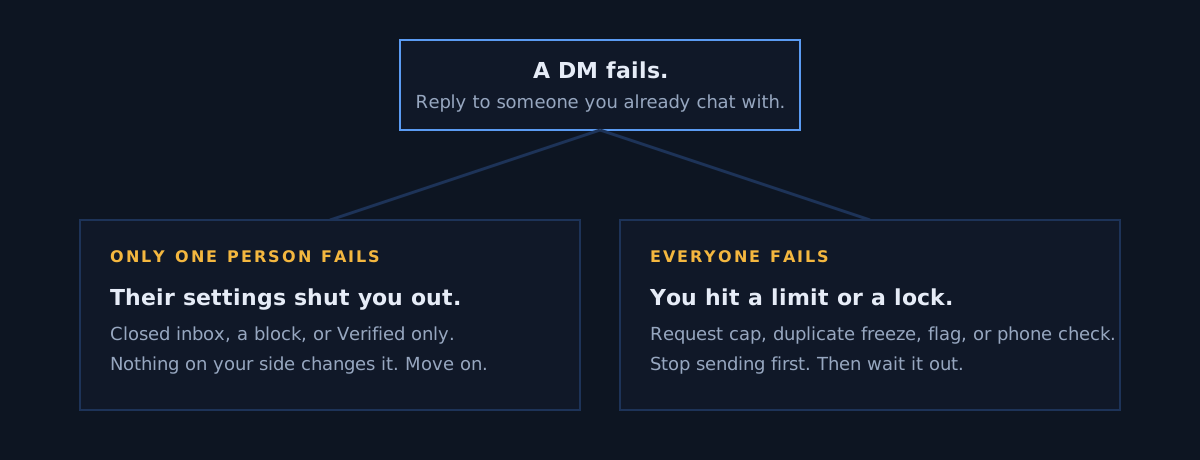
Test it: reply to someone you already chat with, then try a second person.
If one person fails, the problem is on their side. Fixes 1 and 2. Nothing you do to your account changes it.
If everyone fails, the problem is on your side. Fixes 3 to 6. Stop sending before anything else.
The eight fixes
Fix 1: their inbox is closed to you. Look for the message icon (a speech bubble) next to Follow on their profile. No icon, no way in. Follow them and reply to a post; if they follow back, the icon appears. More in how to DM someone who does not follow you.
Fix 2: a block, or Verified users only. If X shows you are blocked, delete the lead. If not, they may take DMs from Verified users only, which a free account cannot reach.
Fix 3: a short rate limit. X documents one freeze: the same text, or the same link, sent to several people. Stop and wait at least 30 minutes with no attempts, in X's words.
Fix 4: the daily request cap. First messages to non-followers are capped per 24 hours: 7 free, 35 Premium, 75 Premium Plus, 500 Premium Business. The window rolls about 25 to 27 hours after your first send, across the accounts we run. Replies to existing chats still work. Full table in the X DM limit guide.
Fix 5: X flagged the account as automated. Error 226. Check Fix 4 first, because paid accounts that hit the cap get this same error. If you are under the cap, stop every tool and tab that sends and use the account by hand for a while. X does not publish how long the flag lasts.
Fix 6: X locked the account and wants a phone number. Complete the check on x.com in a browser, then send nothing for the rest of the day. About a third of our new accounts hit this once in their first week; every one cleared within 24 hours.
Fix 7: the Chat key would not load. Log out on that device, log back in, enter your Chat PIN if asked. X says 20 wrong PINs destroy the keys for good. Do not resend; nothing was refused.
Fix 8: stuck on Sending. Fix your connection, update the app, drop the photo or video, or try from x.com.
How long does each one last?
| What stopped you | How long |
|---|---|
| Duplicate text or link freeze | At least 30 minutes with no attempts, in X's words. |
| Daily request cap | About 25 to 27 hours from your first send, from what we saw. |
| Automation flag, error 226 | X publishes no length. |
| Phone or puzzle lock | Until you complete it. Under 24 hours in every case we logged. |
| Feature lock on DMs | X publishes no length. |
| Suspension | Until an appeal succeeds. |
Stop it happening again
Do not retry. Almost every retry is refused; in one of our workspaces, 11 of 662 got through in a week. One attempt per person, then write to the next one.
Send fewer, slower, and different:
- Verify your phone number before any outreach.
- Stay under your tier's request cap: 7, 35, 75 or 500 a day.
- Write each message so it differs. Never the same link twice.
- Spread sends across the day.
- Keep a list of who you already messaged.
Across several accounts, the counting is the failure point, and it is what we built Xsender to do. What it cannot do is open an inbox someone closed to you.
Do this now: reply to one open chat. If that works and a new chat does not, you are capped. Stop for today and write to those people after the window rolls.
FAQ
Does "you can no longer send messages to this person" mean I am blocked?
Not always. That line also appears when someone closes their DMs to non-followers or unfollows you, and both are more common than a block. X shows a notice on their profile if you are blocked.
Why can I answer old chats but not start new ones?
Because X counts them differently. The request cap only counts first messages to people who do not follow you: 7 a day free, 35 on Premium. A reply in an open chat is not a request, so replies keep working after the cap. The 500 a day ceiling covers both.
Why can't I send DMs on Twitter all of a sudden?
If every DM fails at once, it is a limit or a lock on your account, not a block. The usual causes are the request cap, a duplicate text freeze, or a phone check X wants done. Stop sending, complete any check on x.com, and wait for the window to roll before you try again.
Can X support lift a limit faster?
No. Limits clear on their own when the window rolls, and X publishes no way to shorten that. Support handles appeals against a suspension, not caps or locks. Stop sending, finish any phone or puzzle check, and use the account by hand for the rest of the day.
Sources and method
Show the sources and dates behind this guide
Every claim above traces to one of these.
- X's documented causes, the phone check and the duplicate freeze: X's DM FAQ, archived copy of 9 April 2026.
- Request caps: X's help page on Chat, archived copy of 4 August 2026, confirmed live 10 September 2026.
- Error 226 and its wording: X's API error code page, last static copy 17 May 2022.
- The DM rule: X's automation rules, marked updated April 2026.
- Strings marked reported come from xautodm.com (16 July 2026) and socialrails.com (22 July 2026).
- The window timing, first week locks and retry figure are our own, recorded 1 and 3 September 2026.
- All of it was checked on 10 September 2026.
Written by Oscar Antana.
Hit a limit sending by hand? Start the 7-day free trial